
Google Search Console MCP
A Google Search Console MCP server lets an AI assistant read your Search Console data through the Model Context Protocol. CalmSEO hosts one: connect Google with read-only OAuth, add one URL to Claude, ChatGPT, or Cursor, and ask about clicks, queries, pages, and rankings in plain English. Free on every plan.
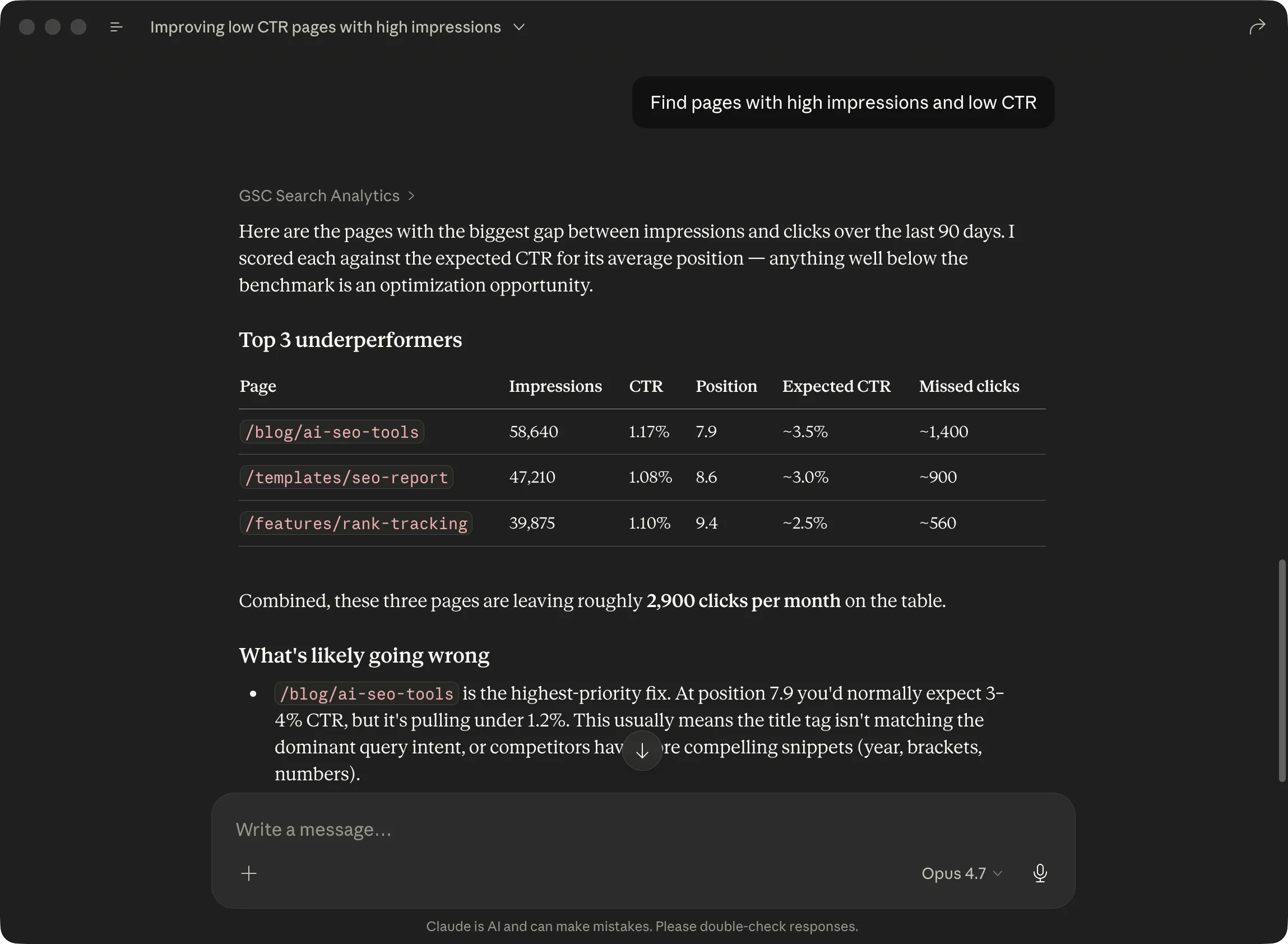
What is a Google Search Console MCP?
A Google Search Console MCP is an MCP server that exposes Search Console data as tools an AI assistant can call. Instead of you opening Search Console, applying filters, and exporting a report, the assistant asks the MCP server for the rows it needs and answers your question directly.
MCP, the Model Context Protocol, is an open standard for connecting AI assistants to outside data and tools. A client such as Claude, ChatGPT, or Cursor connects to an MCP server, reads the list of tools it offers, and calls them when a prompt needs outside data. The server does the actual work and returns structured results.
A GSC MCP server sits between the assistant and Google’s Search Console API. It handles authentication with Google, translates a tool call like “top queries for this property in the last 28 days” into an API request, and returns clicks, impressions, CTR, and position in a shape the assistant can reason about. The terms “GSC MCP”, “Search Console MCP”, and “MCP for Google Search Console” all describe the same thing.
CalmSEO’s version is a hosted SEO MCP server. The six Search Console tools are free and sit next to paid keyword, SERP, and audit tools on the same endpoint.
How the CalmSEO Google Search Console MCP works
There is nothing to install. CalmSEO runs as a remote MCP server over HTTP at https://mcp.calmseo.com/mcp. You add that URL to your client, sign in to CalmSEO through OAuth, and the tools appear in the assistant’s tool list.
Read-only Google OAuth
In the CalmSEO dashboard you connect a Google account. CalmSEO requests exactly two scopes: webmasters.readonly for Search Console and userinfo.email so the dashboard can show which account is connected. There is no write scope, so the server cannot submit URLs, change settings, or remove properties.
Hosted, not local
Many open-source Search Console MCP servers run locally: you clone a repository, create a Google Cloud project, download a service account key, and wire it into a client config file. CalmSEO does the Google Cloud and token handling for you. The same connection works from Claude on the web, Claude Desktop, Claude Code, ChatGPT, Cursor, or anything else that supports remote MCP.
Data freshness
Results come straight from the Search Console API when a tool is called. Google’s Search Analytics data normally lags by two to three days, and the tool descriptions say so, which helps the assistant set the right date range. The data_state parameter on the search analytics tool accepts all or hourly_all if you want Google’s fresh, not yet finalized data instead of the default final.
Which Search Console tools are included?
Six tools, all free, all read-only. Every tool except list_gsc_sites takes a site_url that matches a property exactly, for example sc-domain:example.com or https://www.example.com/. The analytics tools take start_date and end_date in YYYY-MM-DD format and an optional type for web, image, video, news, Discover, or Google News.
| Tool | What it returns | Typical question |
|---|---|---|
| list_gsc_sites | Every Search Console property your connected Google account can read, with its permission level, covering both sc-domain: domain properties and URL-prefix properties. | “Which sites can you see in my Search Console?” |
| query_gsc_search_analytics | Clicks, impressions, CTR, and average position grouped by any mix of query, page, country, device, searchAppearance, date, or hour. Supports up to five filters, web/image/video/news/Discover search types, and up to 25,000 rows. | “Show mobile clicks by day for pages under /blog/ in the last 28 days.” |
| get_gsc_top_queries | The top queries for a property in a date range, sorted by clicks, with impressions, CTR, and position. Up to 250 rows. | “What are my top 50 queries this month?” |
| get_gsc_top_pages | The top landing pages for a property in a date range, with the same four metrics. Up to 250 rows. | “Which pages get the most organic clicks?” |
| get_gsc_page_queries | Every query that drove impressions or clicks for one specific page URL. | “What does /pricing rank for, and where?” |
| list_gsc_sitemaps | Submitted sitemaps for a property, including last-submitted and last-read times, pending status, and error and warning counts. | “Is my sitemap still being read, and does it have errors?” |
The same six tools are also available as REST endpoints under /gsc/ on the CalmSEO API for scripts and automations that do not go through an assistant.
How do I connect Google Search Console to Claude?
- Sign in to CalmSEO and connect your Google account from the dashboard. Approve the read-only Search Console permission.
- In Claude web or Claude Desktop, open Settings, then Connectors, and choose Add custom connector.
- Name it CalmSEO and use https://mcp.calmseo.com/mcp as the remote MCP server URL. Click Connect and finish the CalmSEO sign-in.
- In a new chat, enable CalmSEO from the + menu and ask a Search Console question.
For Claude Code, one command does it: claude mcp add calmseo --transport http https://mcp.calmseo.com/mcp. Full steps and screenshots are in the Claude setup guide, and there is a dedicated walkthrough for connecting Google Search Console to Claude.
How do I connect it to ChatGPT?
ChatGPT adds remote MCP servers through developer mode, not through the Custom GPT builder.
- Open ChatGPT settings, go to Connectors, then Advanced settings, and enable Developer mode.
- Click Create app. Name it CalmSEO and use https://mcp.calmseo.com/mcp as the server URL.
- Choose OAuth for authentication and complete the CalmSEO sign-in.
- In a new chat, pick Developer mode from the + menu, select CalmSEO, and ask about your Search Console data.
If the Developer mode toggle is missing, your plan or workspace may not have access yet. See the ChatGPT setup guide for details.
Cursor, Claude Code, and other MCP clients
Any client that supports remote MCP over HTTP with OAuth can use the same endpoint. In Cursor, add this to ~/.cursor/mcp.json or a project-level .cursor/mcp.json, then refresh MCP servers and authenticate when Cursor first calls a tool:
{
  "mcpServers": {
    "calmseo": {
      "url": "https://mcp.calmseo.com/mcp"
    }
  }
}
The same JSON shape works in most editors and agent frameworks that read an mcpServers config. Step-by-step instructions are in the Cursor setup guide. If you want a scheduled or unattended workflow rather than a chat, see running a Google Search Console AI agent.
Example prompts and what comes back
The assistant decides which tool to call and what to do with the rows. These are typical prompts and the shape of the answer you can expect.
- “Find pages with over 1,000 impressions and CTR below 1% in the last 28 days.” The assistant calls get_gsc_top_pages, filters the rows locally, and returns a short table of pages with their impressions, CTR, and position, usually followed by title and meta suggestions if you ask.
- “Which queries rank between position 8 and 20 with at least 200 impressions?” A striking-distance list built from get_gsc_top_queries or a search analytics query with a position filter. Good input for deciding which pages to update.
- “Compare the last 28 days with the previous 28 and list pages that lost the most clicks.” Two search analytics calls with different date ranges, then a diff. You get the page, clicks before, clicks after, and the change.
- “What queries does /blog/invoice-template rank for?” One get_gsc_page_queries call. The answer lists each query with clicks, impressions, CTR, and position for that URL only.
- “Show clicks by country for the last 90 days and tell me if anything looks off.” A search analytics query with the country dimension, then a short reading of the numbers. The assistant does the interpretation; the MCP only supplies the rows.
- “Are any of my sitemaps failing?” list_gsc_sitemaps for the property, then a plain summary of which sitemaps have errors or warnings and when Google last read them.
Example output
Illustrative output for “What does /blog/invoice-template rank for?” The numbers are made up to show the shape; every row in a real answer comes from your own property.
| Query | Clicks | Impressions | CTR | Position |
|---|---|---|---|---|
| invoice template word | 412 | 18,300 | 2.3% | 9.4 |
| free invoice template | 298 | 24,100 | 1.2% | 11.8 |
| invoice template google docs | 187 | 9,650 | 1.9% | 8.7 |
| simple invoice template | 141 | 7,200 | 2.0% | 10.2 |
| invoice example | 96 | 12,400 | 0.8% | 14.5 |
From there a follow-up like “which of these could reach page one with a title rewrite?” needs no new tool call. Adding keyword volume for each query takes one paid call on the same endpoint. That two-step pattern is the basis of finding SEO opportunities in Search Console.
GSC MCP vs the Search Console API
The MCP server calls the same Google API underneath. The difference is that you no longer write the request or parse the response yourself.
| Search Console API directly | CalmSEO GSC MCP | |
|---|---|---|
| Setup | Google Cloud project, enable the API, OAuth client or service account, token refresh code | Connect Google once in the dashboard, paste one URL into your client |
| Who writes queries | You, in code, with dimensions, filters, and paging | The assistant, from a plain-English prompt |
| Output | Raw JSON rows | Rows the assistant summarizes, tables, or follow-up analysis |
| Best for | Production pipelines and dashboards | Questions, investigations, weekly reviews, content planning |
| Combining with keyword data | Separate provider integration | Same endpoint, same conversation |
| Cost | Free API, your engineering time | Free |
GSC MCP vs exporting CSVs
Pasting a Search Console export into a chat works for one-off questions. It stops working once the question needs more than 1,000 rows, a second date range, or a follow-up.
| Export CSV and paste | CalmSEO GSC MCP | |
|---|---|---|
| Row limit | 1,000 rows per export from the Search Console UI | Up to 25,000 rows per search analytics call |
| Follow-up questions | New export, new paste | The assistant calls the tool again |
| Multiple properties | One export per property | list_gsc_sites, then query any of them |
| Date comparisons | Two exports, manual merge | Two calls, the assistant diffs them |
| Context window | Large pastes eat the assistant’s context | Only the requested rows come back |
| Repeatable | Manual each time | Same prompt every week |
Is there an official Google Search Console MCP?
As of writing, Google has not published an official Google Search Console MCP server. Google provides the Search Console API and client libraries; the MCP servers built on top of it come from third parties.
There are open-source Search Console MCP servers on GitHub. They typically run on your machine, need a Google Cloud project with the Search Console API enabled, and authenticate with a service account key or a local OAuth flow. That is a reasonable path if you are comfortable managing credentials and only use a local client such as Claude Desktop or Cursor.
A hosted GSC MCP like CalmSEO differs in three ways: nothing runs locally, so it also works from Claude on the web and ChatGPT; Google OAuth is handled for you with a read-only scope; and the Search Console tools share an endpoint with keyword, SERP, and page audit tools, so one connection covers most SEO questions.
Security and permissions
The Google connection is limited to the webmasters.readonly scope. CalmSEO can read analytics, property lists, and sitemap status. It cannot submit or remove sitemaps, request indexing, change users, or edit anything in your Search Console account. Every GSC tool is also marked read-only in its MCP annotations, so clients that respect annotations know the call has no side effects.
What CalmSEO stores
To retrieve your data when you ask for it, CalmSEO stores the OAuth tokens, token expiry, granted scopes, connected property URLs, permission levels, and related timestamps. Retrieved Search Console results are held temporarily for up to five minutes and are not used for advertising or to train AI models. The full details are in the privacy policy.
Revoking access
Disconnect Google Search Console from the CalmSEO dashboard at any time. That removes the stored OAuth connection and property list. You can also revoke CalmSEO from your Google account’s third-party access settings, which invalidates the token on Google’s side.
Read-only scope. CalmSEO never writes to your Search Console account and does not share your data with other CalmSEO users.
Pricing and credits
All six Google Search Console tools are free on every plan, including the free tier, with no card required. They never consume credits.
Credits pay only for third-party data on the same endpoint: SERP search (1 to 3 credits per call), keyword search volume (15), keyword ideas (15 to 50), ranked keywords (5 to 20), and page audit (5). New accounts start with 20 free credits, and paid plans start at $19 per month. See full pricing.
Plans
Search Console tools are free on every plan. Credits only pay for keyword volume, SERP, ranked keywords, and page audits.
For trying it out.
Get started- 20 credits to start
- Search Console tools with basic limits
- MCP and REST API access
- OAuth-secured
For one builder.
Get started- 600 credits / month
- Search Console tools with higher limits
- MCP and REST API access
- Email support
For growing workflows.
Get started- 1,500 credits / month
- Search Console tools with higher limits
- MCP and REST API access
- Email support
For agencies.
Get started- 3,500 credits / month
- Search Console tools with higher limits
- MCP and REST API access
- Priority support
Frequently asked.
Is a GSC MCP the same as a Google Search Console MCP?+
Yes. GSC MCP, Search Console MCP, and Google Search Console MCP server all refer to an MCP server that exposes Search Console data as tools for an AI assistant. CalmSEO’s implementation is one of them.
Which AI assistants does this work with?+
Any client that supports remote MCP over HTTP. That includes Claude on the web, Claude Desktop, Claude Code, ChatGPT in developer mode, Cursor, and Codex, among others. You add the CalmSEO MCP URL once and the Search Console tools show up alongside the rest.
Does it work with Claude Code?+
Yes. Run claude mcp add calmseo --transport http https://mcp.calmseo.com/mcp, then authenticate when prompted. The Search Console tools are then available in any Claude Code session.
Is it really free?+
Yes. The six Search Console tools are free on every plan, including the free tier, and no card is needed to connect. Credits only apply to paid tools like keyword volume, SERP search, ranked keywords, and page audits.
Can it write to Search Console or submit URLs?+
No. CalmSEO requests only the read-only Search Console scope. It can read analytics, queries, pages, and sitemap status. It cannot submit sitemaps, request indexing, or change property settings.
How fresh is the data?+
Every call goes to Google’s Search Console API at the time you ask. Google’s reporting usually lags by two to three days, so very recent traffic may not appear yet. The search analytics tool can request Google’s fresh, not yet finalized data if you need it.
Do I need a Google Cloud project or API key?+
No. CalmSEO handles the Google OAuth client and token refresh. You sign in with the Google account that has access to your Search Console properties and approve read-only access.
Can I query more than one Search Console property?+
Yes. Every property the connected Google account can read is available. The assistant calls list_gsc_sites to see them and passes the exact property ID, such as sc-domain:example.com, to the other tools.
Can it combine Search Console with keyword research data?+
Yes. The same MCP endpoint exposes keyword volume, keyword ideas, ranked keywords, and SERP tools. Your assistant can pull striking-distance queries from Search Console and look up volume for each in one conversation.
Does it replace Search Console?+
No. Search Console still has its own UI, alerts, URL inspection, and indexing controls. The MCP is for asking questions about the data Search Console exposes through its API.
Bring Search Console into your AI assistant
20 free credits + free Google Search Console tools. No card required.